![[FA] SIT One SITizen Alumni Initiative_Web banner_1244px x 688px.jpg](/sites/default/files/2024-12/%5BFA%5D%20%20SIT%20One%20SITizen%20Alumni%20Initiative_Web%20banner_1244px%20x%20688px.jpg)
XRAuthor
February 27, 2025


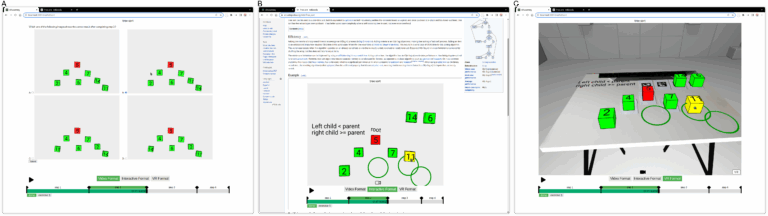
Fig. 1. (A) Video Format: a participant answering a multiple-choice question in a standalone web app, (B) Interactive Format: a participant interacting with cubes to complete a step of the learning content embedded on the Wikipedia page for tree sort, and (C) VR Format: a participant completing a step in VR.
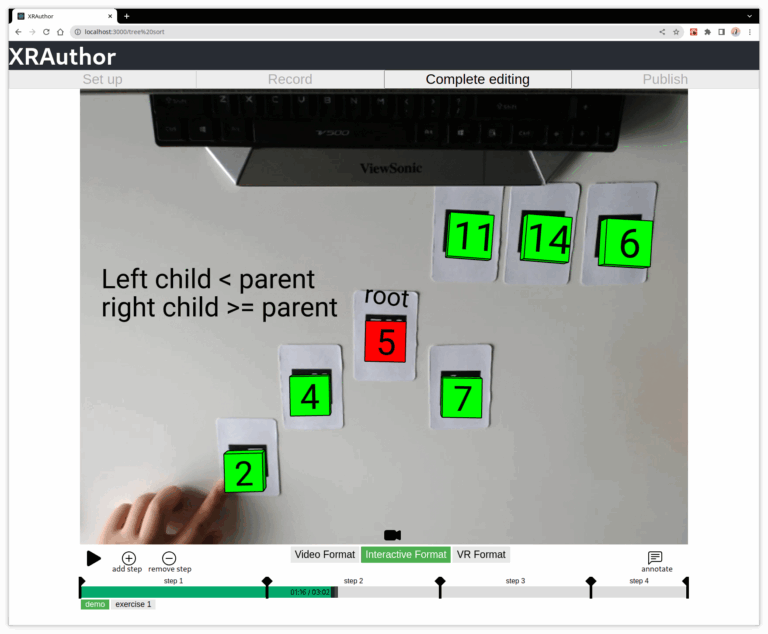
Fig. 2. A video recording is being edited in the tool.
Considering accessibility, the team implemented the tool to run in a web browser on a computer without requiring any installation. It has a minimalist UI (see Fig. 2), with four buttons for the tool’s major modes at the top, a viewing area for displaying authored content in the middle, and a progress bar with editing and playing controls at the bottom.
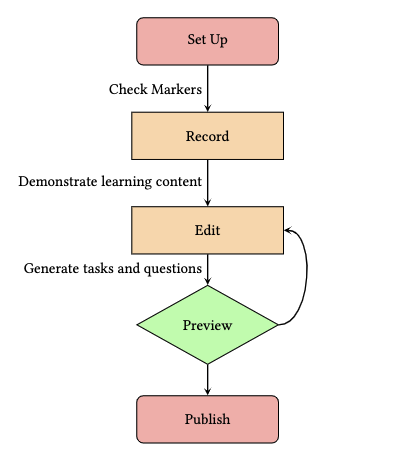
Fig. 3. Tool Authoring Process
After setting up the markers, the authoring process can start with recording a regular demonstration video and then proceed through an edit-review loop on the video footage until the author is satisfied with the content and uploads it to the server (see Fig. 3). The content can be used as a standalone web app or embedded in existing web pages. Learners can access the content online in their preferred format (see Fig. 1).